DNS (Domain Name System)
What is DNS?
DNS(Domain Name System) is the phone book of the Internet. The Computers at the IRS prefer to use fixed-length security numbers. Just as humans can be identified in many ways, so too can Internet hosts. One identifier for a host is its hostname. Hostname- www.google.com etc. These hostnames are mnemonic and are appreciated by humans.
Hostnames can consist of variable-length alphanumeric characters, They would be difficult to process by routers. For these reasons, hosts are identified by so-called IP Addresses.
DNS's main work is to translate hostnames to IP addresses.
DNS is
(1) A Distributed database implemented in a hierarchy of DNS Servers
(2) An Application-Layer protocol that allows hosts to query the distributed database.
How DNS Work
A simple design for DNS would have one DNS that contains all the mappings. In this centralized design, clients simply direct all queries to the single DNS server and the DNS server responds directly to the querying client. Some problems with a centralized design are:
(1) A single point of Failure
(2) Traffic Volume
(3) Distant Centralized database
(4) Maintenance
To deal with the issue of scale, the DNS uses a large number of servers, organized hierarchically and distributed around the world.
There are three classes of DNS Servers
(i) Root DNS servers
(ii) Top-level domain (TLD) DNS servers
(iii) Authoritative DNS servers
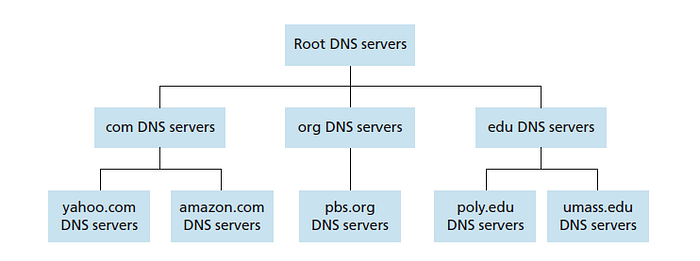
Root DNS servers: On the Internet, there are 13 root DNS servers. Each “server” is a network of replicated servers for both security and reliability purposes. The DNS client wants to determine the IP address for the hostname. So the first client first contacts one of the root servers, which returns IP Addresses for TLD servers for top-level domain name com.
Top-level domain (TLD) servers: These servers are responsible for top-level domains such as com, org, net,edu, and gov. and all of the country's top-level domains such as in,uk,fr, ca, and jp.
Authoritative DNS servers: Every organization with publicly accessible hosts on the Internet must provide publicly accessible DNS records that map the names of those hosts to IP addresses.
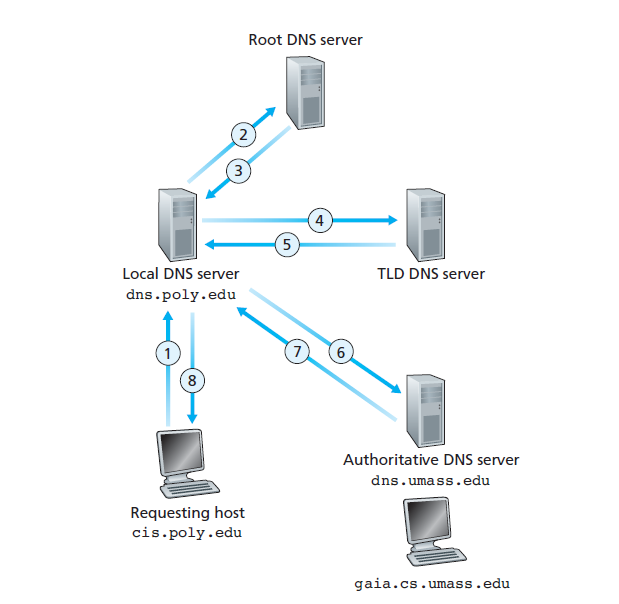
There are mainly three types of servers: Primary servers, secondary servers, and caching servers.
DNS Configuration
We are going to configure DNS between two machines One is Windows and the other is Linux. Linux machine is on Virtual Machine and A Windows base machine.
Step 1:
Find the IP of the Windows machine with the ipconfig command
ipconfig
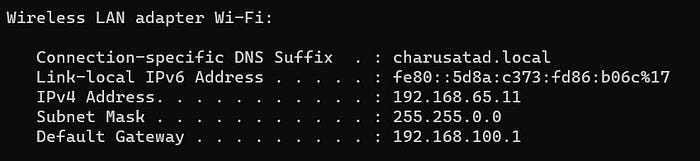
Step 2:
After finding the IP of the Windows machine we have to start the Linux Virtual machine and in the Linux terminal, We have to write the following command.
echo '192.168.65.11 CN_DNS.com' | sudo tee -a /etc/hosts

This command will enter our DNS name(CN_DNS.com) and IP(192.168.65.11) of the windows machine into /etc/hosts file
Step 3:
Now we have to check whether our hostname is present in the /etc/hosts file or not.
cat /etc/hosts(if you are not in etc directory)
cat hosts(if you are in etc directory)
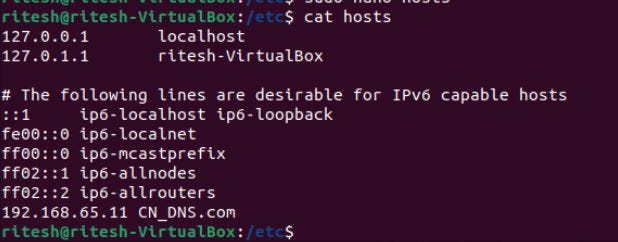
As you can see our hostname and IP of Windows machine are in file /etc/hosts
Step 4:
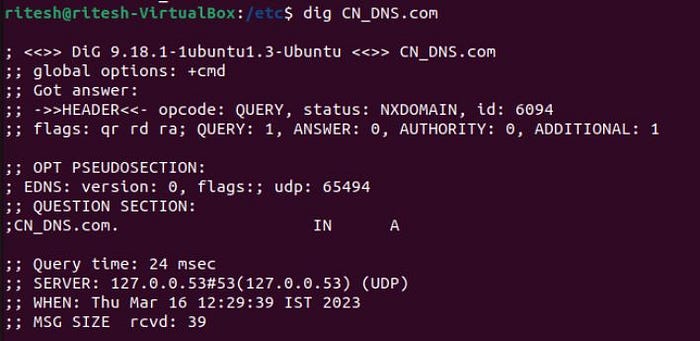
In this step, we are going to use the dig command which is a robust command-line tool developed by BIND for querying DNS nameservers.
dig CN_DNS.com
It will ping our DNS name server and we’ll see the following output.
Step 5:
Now as a last step, we are going to ping our DNS server and see if it is pinging or not.
ping CN_DNS.com
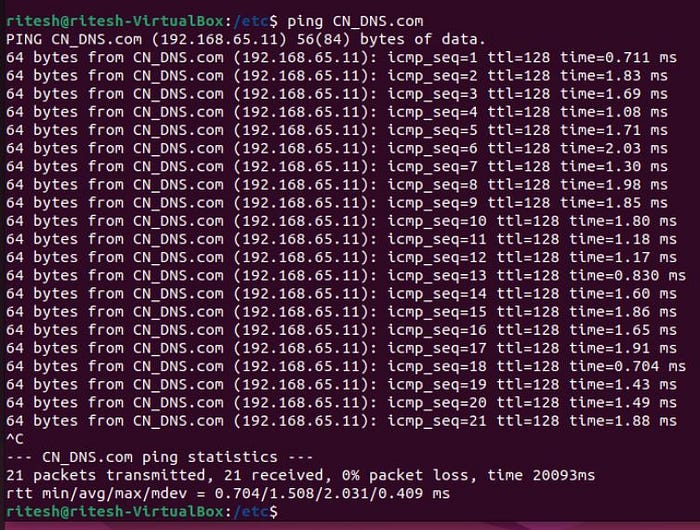
Using this step we can configure DNS in our system. We learn about the DNS importance and use of DNS. DNS ensures the internet is not only user-friendly but also works smoothly, loading whatever content we ask for quickly and efficiently.
